
Claude Ahsan
November 12, 2026
A founder once showed me the portfolio of the designer he’d just hired. It was gorgeous: glassy cards, soft gradients, perfect 3D icons. He’d decided to hire a SaaS UX designer based almost entirely on those screens.
Three months later, his new dashboard looked amazing, and his activation rate hadn’t moved at all. The designer had never asked a single question about his users.
When you hire a SaaS UX designer, pretty screens are the easiest part to judge and the least important part of the job. In this guide I’ll walk you through the skills that matter, how to read a portfolio, the red flags to catch early and the questions that separate real SaaS designers from Dribbble decorators.
First, be clear about the job. “We need design” can mean very different things:
Each one needs a slightly different person. Not sure which bucket you’re in? Our post on UX audit vs UX redesign will help you decide.
A great SaaS designer is curious before they’re creative. They ask who your users are, what they’re trying to get done, and where they get stuck.
Surprisingly, that’s rarer than it should be. McKinsey’s Business Value of Design research found that over 40% of companies still don’t talk to their end users during development, and only around half run user research before generating their first design ideas.
A SaaS product has tables, filters, user roles, permissions, empty states and dashboards full of numbers, and your designer needs to make all of it scannable.
People don’t read your UI line by line. In NN/g’s classic study on how users read online, 79% of users scanned the page, while only 16% read word by word. Therefore, ask to see real dashboards in their portfolio as well as landing pages.
Next, check whether they design for everyone. The WebAIM Million 2026 report found detectable WCAG failures on 95.9% of the top one million home pages. A good designer checks contrast, labels and focus states without being reminded.
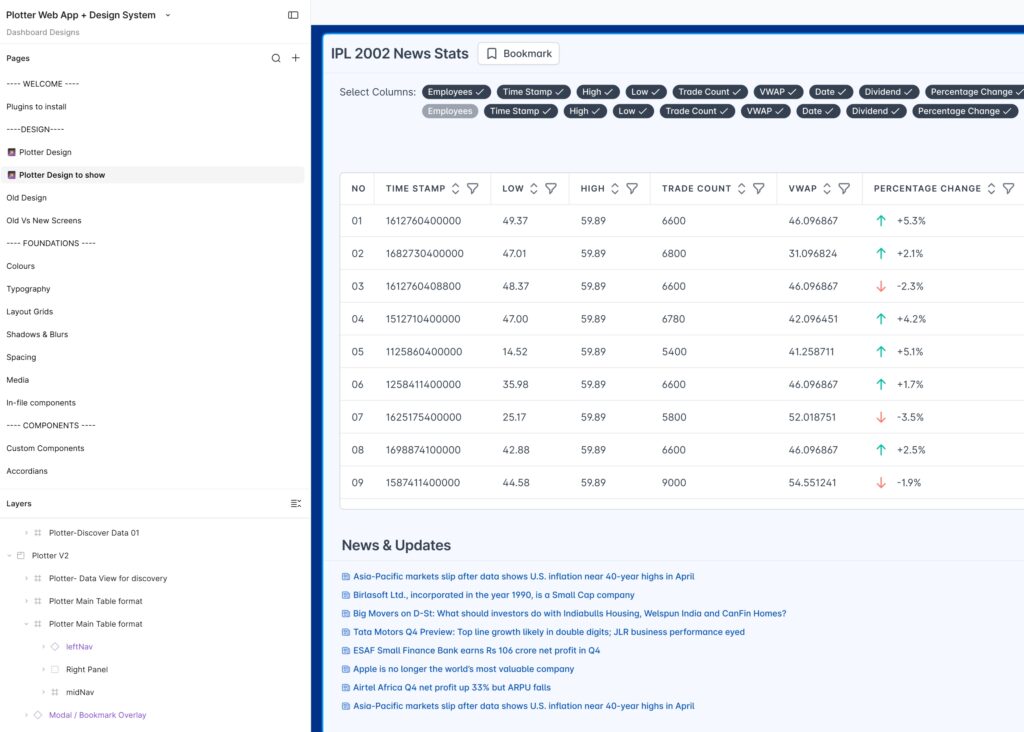
Also, ask how they hand off work. Look for organized Figma files, reusable components and a small design system. Otherwise, your developers will be guessing spacing values at 2 a.m.
Final screenshots only tell part of the story.
When Nielsen Norman Group surveyed 204 UX professionals in charge of hiring, they kept asking for the same things: the problem, the designer’s role, the constraints, and how research shaped the design. In other words, they wanted to see the messy middle as well as the polished end.
Most bad design hires don’t look bad at the start. However, these warning signs usually show up in the first call or the first week:
Use these on your first call. I’ve added what a good answer usually sounds like.
Many SaaS products are what NN/g calls complex applications, built for highly trained users with nonlinear workflows in specialized domains. So these questions show whether someone has really shipped one:
Interviews tell you how someone talks. A small paid project tells you how they think.
So before you hire a SaaS UX designer for a big redesign, give them one contained task. For example, ask for an audit of your onboarding flow or a quick test of your signup with real users. It doesn’t need to be a big study, either: NN/g’s research shows that testing with just 5 users uncovers about 85% of usability problems.
Within a week or two, you’ll see how they communicate and prioritize, and whether their findings make you say “oh wow, we never noticed that.”
Chris, the founder of Plotter, was building an analytics app that anyone could use to draw charts and graphs. During our work, the major issue turned out to be poor information architecture, along with weak buttons, unclear labels and no way to export reports.
So we fixed the structure first. For instance, we advised a 5-level breadcrumb for navigating deep data sources, then built a full design system in Figma and redesigned the dashboard on top of it.
That’s what you’re paying for when you hire a SaaS UX designer: someone who finds the right problem before solving it. Wondering about the alternatives? Compare a SaaS design agency vs freelancer vs in-house designer.
Quick recap:
If you’d rather skip the hiring marathon, our SaaS UX design team can start with a focused audit this week.
The wrong hire costs you months, and the right one can pay for itself in the first sprint. Let’s make sure you get the right one.
👉 Get a UX Audit for your SaaS product OR book a FREE 15-minute discovery call with our team.
We focus on fewer projects to craft amazing digital products