Most SaaS founders think they know their users — until the reviews prove otherwise. That gap is exactly why SaaS UX research matters so much before you write another line of code.
It’s an easy trap. Tech-savvy founders build from their own pain points, ship fast, and assume the market will catch up. But 80% of startups fail, and skipping user experience research early on is one of the most common reasons why.
Before you write another line of code, ask yourself two questions:
Have you validated your product idea with real users?
Have you actually interviewed your primary SaaS user — not just guessed at what they want?
If the answer is no, here’s a practical framework for doing SaaS UX research properly, at every stage of your product.
Roughly 86% of product ideas come from a developer’s own frustration — a personal pain point turned into a business. That’s not a bad starting point, but it’s a dangerous place to stop.
The instinct to “just build and iterate” often ignores a bigger risk: you might be solving a problem your users don’t actually have. A lean user research phase — even just one to two weeks of interviews and competitor analysis — can save months of wasted development.
2. SaaS UX Research Questions to Ask at Each Stage
Strategy phase: before you build anything
What do people actually need? (Their primary goal, not yours.)
Who are your users — one persona, or several?
How are they solving this problem today? Spreadsheets? Competitors? Manual workarounds?
What does their daily workflow and environment look like?
Do they genuinely have the problem you’re planning to solve?
Would they pay to have it solved?
Which features actually belong in your MVP?
How many user personas do you have?
MVP phase: testing with a prototype
Can people actually use what you’ve built — a Figma prototype or a vibe-coded MVP?
Are early users willing to pay for it?
How do you turn first use into a habit?
Is the product usable, not just functional?
Is it better than a competitor in at least one clear way?
Which design decisions produce better results with your real user base?
Do users hit an “aha moment” — or just confusion?
Evaluation phase: after launch
Does the product solve the user’s pain point efficiently?
Do users actually see and articulate the value?
What does usability testing reveal that your analytics can’t?
3. Understand Your Users as People, Not Data Points
Good SaaS UX research starts with empathy. Your users have daily frustrations, specific goals, and triggers behind those goals — and they rarely state their real needs outright. You have to dig for them.
Understanding why someone wants a feature — not just that they asked for it — is what actually shapes good product decisions.
4. Why Quantitative Data Alone Isn’t SaaS UX Research
Marketing- and sales-led founders tend to over-index on conversion rates and A/B tests. That data matters, but it can’t tell you whether someone can actually use the feature they just paid for.
When users hit friction they can’t resolve, they don’t quietly churn — they leave scathing reviews, sometimes naming the founder directly. If your SaaS product doesn’t clear roughly an 80% usability bar (or beat your closest competitor), retention becomes an uphill fight regardless of how well you’re converting new signups.
5. Watch for the Gap Between System Models and Mental Models
Users often think about your product completely differently than you built it — and that mismatch is where usability breaks down.
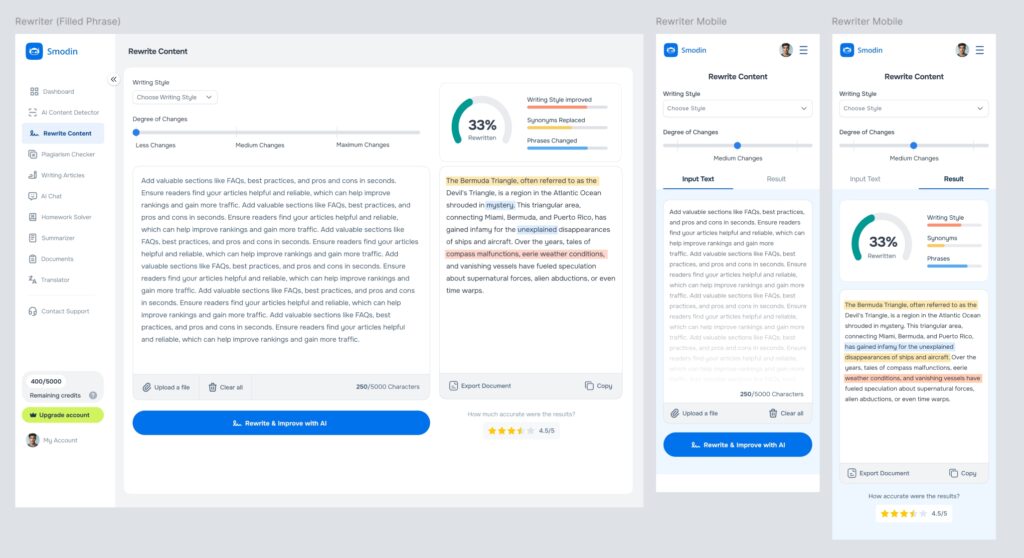
Case in point: Smodin.io, an AI writing tool for academic use. Users were drafting theses inside Smodin, then copy-pasting the text into a separate AI detector to check Smodin’s own output — misunderstanding that AI detection only estimates probability, not certainty, and can’t flag exact AI-written words or sentences.
The fix wasn’t a new feature. It was clarity: we redesigned the AI-detection results to clearly show a percentage-based probability (e.g., “40% AI probability”) instead of an ambiguous pass/fail signal, and relabeled confusing buttons so users understood what the tool could and couldn’t tell them.
That single UX audit resolved a support and trust issue that no amount of marketing could have fixed.
6. Start With a SaaS UX Audit If You’ve Already Launched or Launching soon
If you’ve already built your MVP — which, thanks to today’s AI and vibe-coding tools, is faster than ever — the next step isn’t necessarily more features. Instead, it’s a SaaS UX audit. A proper SaaS UX research audit uncovers usability and accessibility issues, maps out broken user flows, and ultimately gives you a prioritized, fixable list. In many cases, this turns out to be the fastest path to reducing churn and improving long-term retention. So, rather than guessing at your next feature, consider starting with a clear picture of where users are actually getting stuck.
A proper audit uncovers usability and accessibility issues, maps out broken user flows, and gives you a prioritized, fixable list — often the fastest path to reducing churn and improving retention.
Ready to see where your SaaS product is losing users?
It is learning from real users at each stage of the product, before you build, while you test an MVP and after launch, so you validate and improve the product with evidence instead of assumptions.
When should a SaaS startup start UX research?
Before writing code. The post recommends a lean research phase of just one to two weeks of interviews and competitor analysis, which can save months of wasted development.
What should I ask users when testing an MVP?
Can people actually use your prototype, are early users willing to pay, is the product usable and not just functional, is it better than a competitor in at least one clear way, and do users reach an aha moment or just confusion.
Why is analytics data not enough for UX research?
Conversion rates and A/B tests matter, but they cannot tell you whether someone can actually use the feature they just paid for. Qualitative research such as interviews and usability testing fills that gap.
What is the gap between a system model and a mental model?
Users often think about your product differently from how it was built, and that mismatch is where usability breaks down. On Smodin, users misread AI-detection results, so we redesigned them to show a percentage probability and relabeled confusing buttons. See the Smodin case study.