A SaaS UX audit can easily reveal one of a founder’s worst nightmares: user drop-off. Picture a simple scenario. You’ve built a great B2B or B2C SaaS product, yet when people start using it, they somehow leave and never come back.
Worse still, they rarely give you a second chance. In fact, a Frontegg survey of 439 SaaS users found that 15% won’t return after a bad first login.
We’ve performed UX audits for many AppSumo and Product Hunt startups and SaaS products. So below, we’ve gathered the most common user drop-off reasons we keep finding, along with what you can do about each one.
A SaaS UX audit is a structured review of your product’s flows, screens and data, such as session recordings, analytics and usability heuristics. Its goal is simple: find exactly where and why users get stuck. Think of it as a health check-up before the expensive surgery of a full redesign.
If you want the complete list, our SaaS UX audit checklist covers 40 things to check before a redesign. For now, let’s start with the five problems we see most often.
It’s just like meeting someone new. Even if that person is great, if they’re wearing a terrible outfit, you might not even start a conversation. Similarly, if your product’s first impression isn’t great, your users will surely drop off.
Science backs this up, too. Researchers at Carleton University found that people judge a website’s visual appeal in just 50 milliseconds, and that snap judgment colors everything that follows (Nature, 2006). Moreover, 48% of SaaS users have abandoned a product because the sign-up process was too slow (Frontegg).
All of these factors shape the first impression. Curious how this looks in practice? See how our onboarding UX team simplified a bulky, multi-screen onboarding flow for Two Minutes Reports, a Product Hunt winner. You can browse more examples in our case studies.
So you’ve onboarded your user with a great experience. Now the user is in your house, which means they must be able to find anything they’re looking for. This is where you show off your best features and clear next steps.
Unfortunately, confusion here is costly. According to Wyzowl data cited by Custify, 80% of users have uninstalled an app because they didn’t understand how to use it.
For example, take a look at the dashboard redesign we did for Smodin, an AI writer SaaS app, where our audit of session recordings uncovered 37+ usability issues.
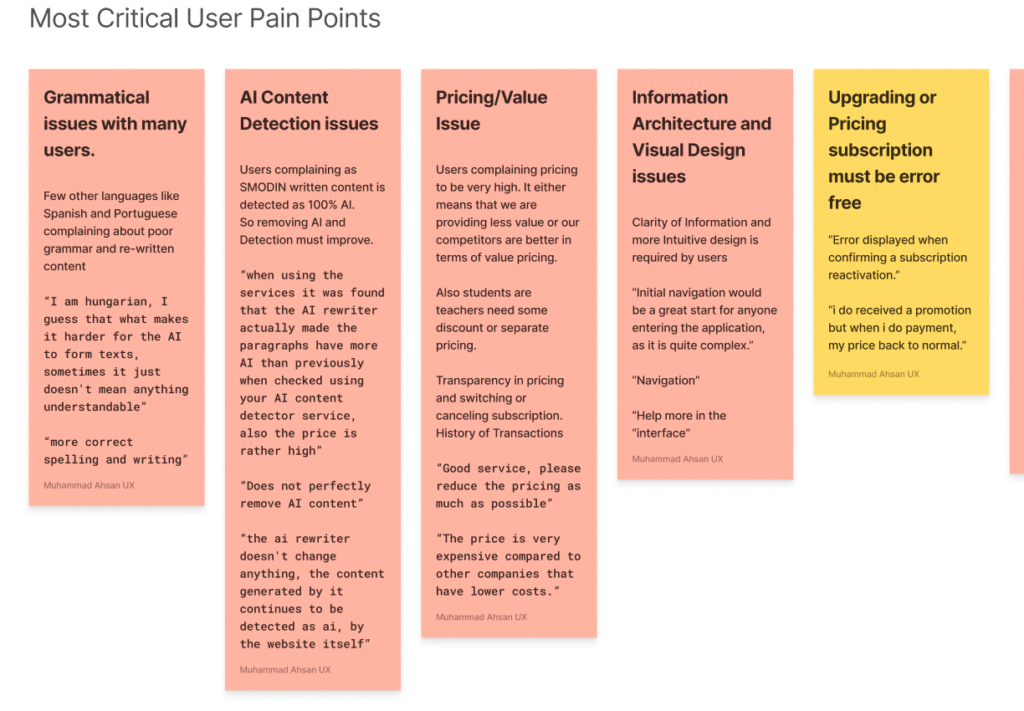
You need to tap into your users’ behavior. Do they use your SaaS app daily, weekly or just a few times a year? Once you know that, you can design the right triggers and rewards, an idea Nir Eyal explains well in his Hook Model.
After all, retention pays off massively. Research by Frederick Reichheld of Bain & Company shows that a 5% increase in customer retention can lift profits by 25% to 95% (Harvard Business Review).
Ask a few of your current or potential users these questions:
Let’s assume you have a perfect product, but you’re charging three times what your competitors charge. Naturally, your conversion will drop. That’s why, whenever you launch a product, I recommend penetrating the market first.
Also, keep your pricing page simple. In Sheena Iyengar’s famous jam study, 30% of shoppers bought when they were offered 6 flavors, compared with only 3% when they were offered 24 (NPR). In other words, too many choices can freeze buyers.
That’s why a SaaS UX audit should always include your pricing page, because it’s where hesitation quietly turns into lost revenue.
Many startup founders and SaaS stakeholders think spending on UX and UI is a waste of money and time. However, UX and UI aren’t just the makeup or beautification of a product.
Trust is visual first. In a Stanford study of 2,684 people, 46.1% judged a website’s credibility partly by its design and look (Stanford Web Credibility Project). Likewise, 58% of SaaS users have refused to sign up for a product because the login felt sketchy (Frontegg).
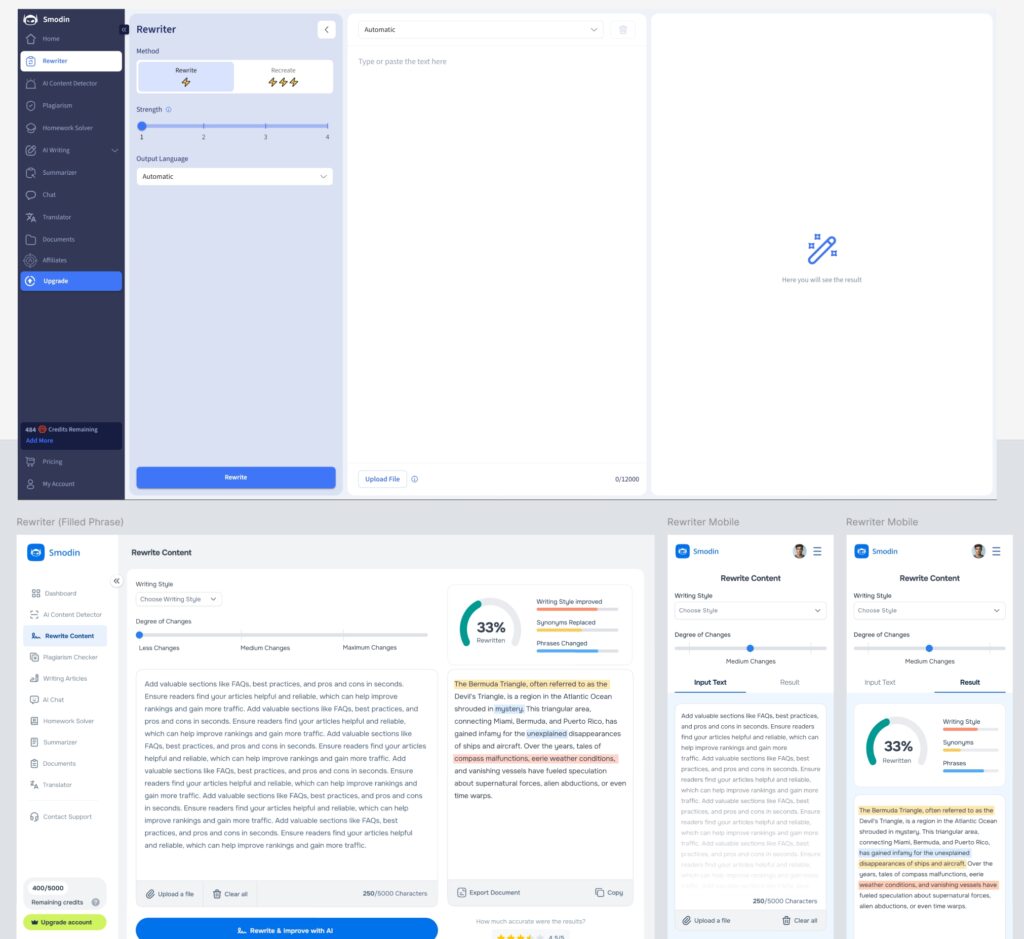
On top of that, a great user experience earns you positive reviews and better product ratings. And if you’re planning a bigger overhaul, our UX design for SaaS team can take you from audit to a full redesign.
These tips will help you, as a founder, build a better experience for your SaaS startup. Still, it’s hard to see your own product with fresh eyes. That’s exactly what a SaaS UX audit gives you: an outside, evidence-based view of where users struggle and what to fix first.
Your users are already telling you what’s broken. The real question is whether you’re listening.
👉 Get a SaaS UX Audit from ProDesign or book a free 15-minute discovery call, and let’s find out what’s driving your users away.
We focus on fewer projects to craft amazing digital products
